
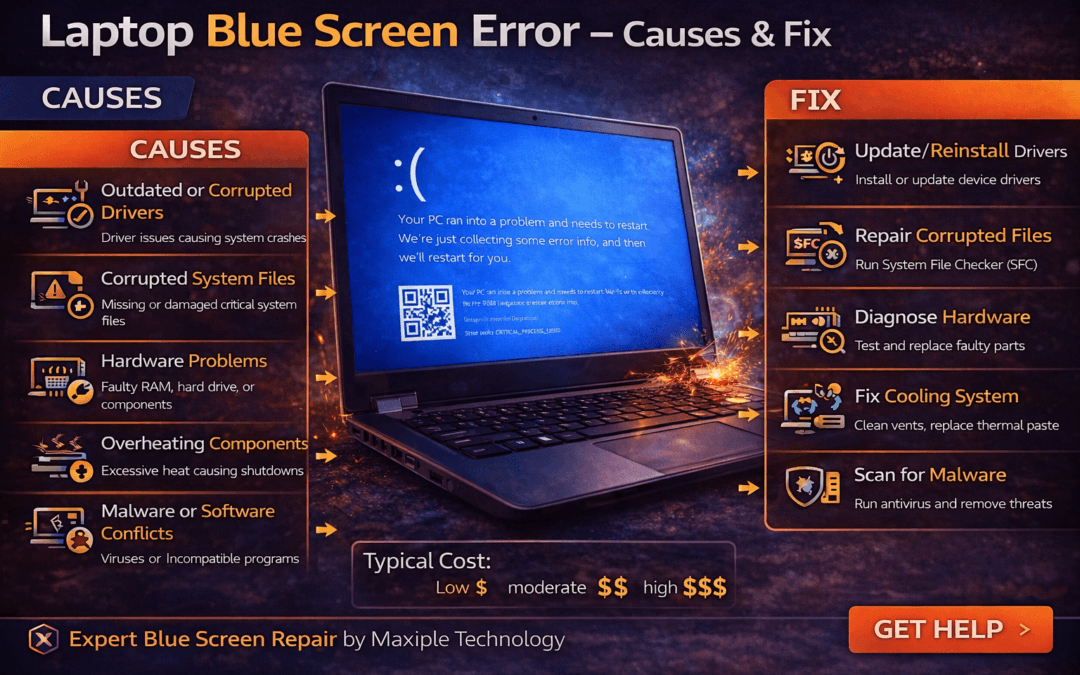
Understanding the Laptop Blue Screen Error
A blue screen error, commonly known as the Blue Screen of Death (BSOD), is one of the most serious problems laptop users can face. When this error occurs, the operating system suddenly crashes and displays a blue screen with an error message. The laptop blue screen error – causes & fix issue usually indicates a critical system failure that prevents the laptop from continuing normal operation.
This problem can occur due to hardware failures, corrupted system files, incompatible drivers, or overheating components. Understanding the laptop blue screen error – causes & fix can help users diagnose the problem quickly and restore system stability.
Common Causes of Laptop Blue Screen Error
Outdated or Corrupted Drivers
Signs
One of the most common reasons behind the laptop blue screen error – causes & fix issue is outdated or corrupted device drivers. Drivers allow the operating system to communicate with hardware components such as graphics cards, network adapters, and storage devices. When these drivers become incompatible or damaged, the system may crash and display a blue screen error.
Fix
Updating drivers from the laptop manufacturer’s website or through the operating system update tools can often resolve the issue. Reinstalling problematic drivers may also restore system stability.
Corrupted System Files
Signs
System files are essential for the proper functioning of the operating system. If these files become corrupted due to improper shutdowns, malware, or failed updates, users may experience the laptop blue screen error – causes & fix problem. Signs may include repeated system crashes, error codes on the blue screen, or the laptop restarting unexpectedly.
Fix
Running system repair tools such as System File Checker (SFC) or Startup Repair can help detect and repair corrupted files. These tools restore missing or damaged system components automatically.
Hardware Problems
Signs
Faulty hardware components such as RAM, hard drives, or graphics cards can also cause the laptop blue screen error – causes & fix issue. Users may notice frequent crashes when performing heavy tasks or while booting the system.
Fix
Running hardware diagnostic tools can help identify faulty components. Replacing damaged hardware parts is usually necessary to resolve the issue permanently.
Overheating Components
Signs
Overheating can cause laptops to crash unexpectedly, resulting in a blue screen error. When internal temperatures rise beyond safe limits, the system may shut down automatically to protect hardware components. This may appear as a laptop blue screen error – causes & fix situation.
Fix
Cleaning laptop cooling vents, ensuring proper airflow, and replacing thermal paste can help prevent overheating-related crashes.
At Maxiple Technology, technicians perform advanced hardware diagnostics and cooling system repairs to resolve overheating problems. You can explore repair services here:
https://maxipleitservices.com/
Malware or Software Conflicts
Signs
Malicious software or incompatible programs can interfere with system operations and cause the laptop blue screen error – causes & fix issue. Users may notice crashes occurring after installing new software or suspicious applications.
Fix
Running a full antivirus scan and removing problematic software can resolve these conflicts. Keeping the operating system updated also improves system security and stability.
Professional Laptop Blue Screen Repair Services
If troubleshooting steps do not fix the laptop blue screen error – causes & fix problem, the issue may involve deeper system or hardware faults.
Maxiple Technology offers professional laptop repair services including:
Operating system repair and reinstall
RAM and hardware diagnostics
Hard drive and SSD repair
Driver troubleshooting
MacBook and Windows laptop repair
You can also check customer reviews here:
https://share.google/CjaTyEXpJX72nL6LX
Professional technicians can diagnose blue screen errors and restore stable laptop performance.
Conclusion
The laptop blue screen error – causes & fix issue can occur due to corrupted drivers, system file errors, hardware faults, overheating, or malware infections.
While some problems can be fixed through basic troubleshooting, others may require professional diagnostics and repair. Understanding the laptop blue screen error – causes & fix helps users quickly identify the problem and prevent repeated system crashes.
I ran into the same frustrating blue screen issue on my laptop last month, losing some important files in the chaos. Stellar Data Recovery worked wonders for me, pulling everything back safely without any hassle. Thanks for the helpful post, it lines up exactly with what fixed mine!