
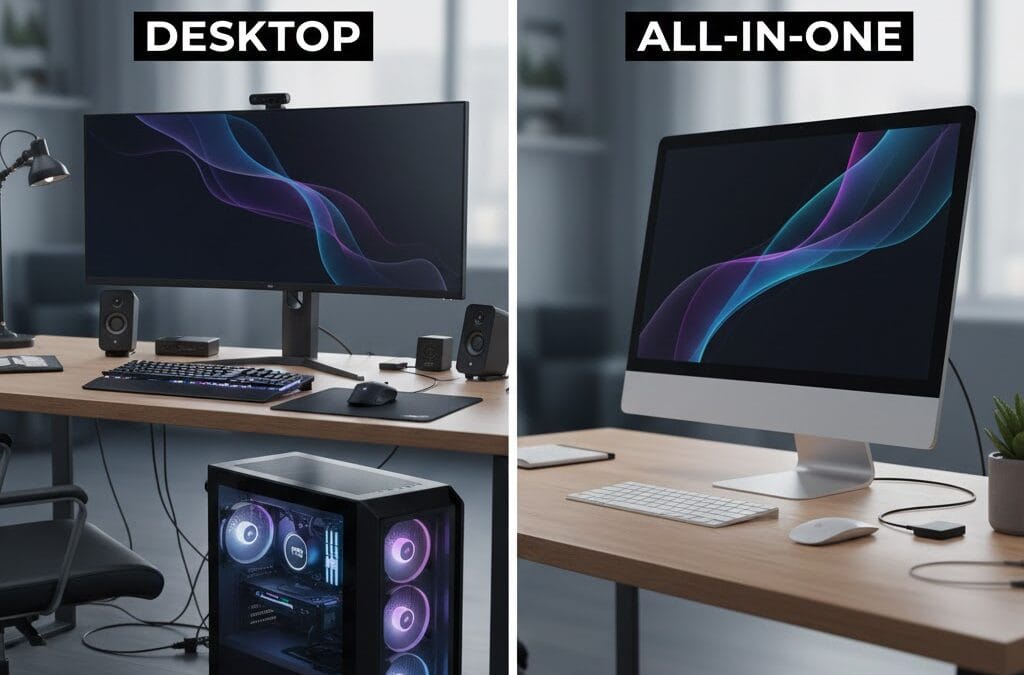
Choosing between Desktop vs All-in-One computers can be confusing, especially when both options look powerful and modern. Many users struggle to decide which system fits their work, budget, and space requirements. While traditional desktops are known for performance and upgrade flexibility, all-in-one computers attract users with their sleek design and minimal setup.
In today’s digital world, computers are essential for work, education, and entertainment. Understanding the real differences between Desktop vs All-in-One systems helps you make a smart long-term investment. This guide explains performance, design, cost, and usability in simple terms. Whether you are a student, professional, or business owner, this comparison will help you select the right computer confidently.
What Is a Desktop Computer?
A desktop computer is a traditional system with separate components like CPU, monitor, keyboard, and mouse. These systems are popular for offices, gaming setups, and professional workloads requiring high performance.
Desktop computers are usually placed on a desk or under it. They offer better airflow and larger internal space for hardware components. Because of this, desktops handle heavy applications more efficiently.
Desktop Hardware Flexibility
One major advantage in Desktop vs All-in-One comparison is flexibility. Desktop users can upgrade RAM, storage, graphics cards, and processors easily. This makes desktops ideal for long-term use.
Desktop Performance Capabilities
Desktop computers often outperform all-in-one systems in raw power. They support high-end processors and dedicated graphics cards without overheating issues.
What Is an All-in-One Computer?
An all-in-one computer integrates the CPU, monitor, and speakers into a single unit. These systems are designed to save space and reduce cable clutter.
All-in-one computers are popular in homes and modern offices. They look stylish and require minimal setup, making them beginner-friendly.
Design Benefits in Desktop vs All-in-One
When comparing Desktop vs All-in-One, design plays a major role. All-in-one systems offer a clean workspace with fewer wires and compact form.
All-in-One Space Efficiency
All-in-one computers are perfect for small desks and limited spaces. They are easy to move and visually appealing.
Desktop vs All-in-One Performance Comparison
Performance is a key factor in Desktop vs All-in-One decision making. Desktop systems generally provide higher processing power due to better cooling and larger components.
All-in-one computers focus more on balanced performance. They are suitable for everyday tasks like browsing, office work, and light editing.
Gaming in Desktop vs All-in-One
Gaming performance strongly favors desktop computers. Desktops support powerful GPUs and advanced cooling systems. All-in-one systems struggle with high-end gaming needs.
Professional Workloads Comparison
For video editing, 3D rendering, and software development, desktops deliver consistent performance. All-in-one systems are better for basic professional tasks.
Desktop vs All-in-One Cost Analysis
Price differences matter when choosing Desktop vs All-in-One computers. Desktop systems often offer better value for performance.
All-in-one computers are usually more expensive due to their compact design and integrated display.
Initial Purchase Cost
Desktop computers allow budget customization. You can build or buy systems based on your exact requirements. All-in-one systems come as fixed packages.
Long-Term Cost Considerations
Desktop upgrades are cheaper over time. All-in-one repairs and upgrades can be costly and limited.
Upgrade and Maintenance in Desktop vs All-in-One
Upgrade options clearly differentiate Desktop vs All-in-One systems. Desktops are easy to maintain and repair.
All-in-one computers have limited upgrade potential. Most components are tightly packed and difficult to replace.
Desktop Upgrade Advantages
Users can replace individual parts without changing the entire system. This extends the computer’s lifespan significantly.
All-in-One Maintenance Limitations
Servicing all-in-one computers often requires professional support. Component replacement is restricted.
Desktop vs All-in-One for Different Users
Choosing between Desktop vs All-in-One depends on your usage needs. Each system suits different types of users.
Students and casual users often prefer all-in-one systems for simplicity. Professionals and gamers usually choose desktops for power.
Best Choice for Students
All-in-one computers are ideal for online classes, assignments, and entertainment. They require minimal setup and space.
Best Choice for Businesses
Desktop computers are better for offices requiring scalability and performance. They support future upgrades easily.
Final Verdict: Desktop vs All-in-One
The Desktop vs All-in-One debate does not have a single correct answer. Desktop computers are perfect for performance-driven users who need flexibility and upgrades. All-in-one computers suit users who value design, space saving, and convenience.
If you want power, customization, and long-term value, desktops are the smarter choice. If you prefer a clean setup and modern appearance, all-in-one systems are worth considering.
For expert guidance on choosing the right computer, visit https://maxipleitservices.com/ or call 8882841303 for professional IT support and consultation.
